Sorry, but MoC does the nice trick of printing region 2 on the back of their packaging- but the discs themselves are actually region 0. Only with very few exceptions are MoC not region free.unclehulot wrote: The interesting thing is that it plays several MoC DVDs that I have on hand that specify Region 2, including Tabu, Judex & the Mabuse set. So...IS it region unlocked? I don't have any Blu Rays here that are region locked to try, and I'm 1500 miles away from my full collection to experiment further.
All-Region DVD and Blu-ray Player Advice
-
Minkin

- Joined: Fri Aug 07, 2009 3:13 am
Re: All-Region DVD and Blu-ray Player Advice
-
unclehulot
- Joined: Tue Nov 02, 2004 7:09 pm
- Location: here and there
Re: All-Region DVD and Blu-ray Player Advice
Kind of what I thought, but I don't have the equipment here to verify that....but I remember Gary's reviews mentioned it now that I think of it.Minkin wrote:Sorry, but MoC does the nice trick of printing region 2 on the back of their packaging- but the discs themselves are actually region 0. Only with very few exceptions are MoC not region free.unclehulot wrote: The interesting thing is that it plays several MoC DVDs that I have on hand that specify Region 2, including Tabu, Judex & the Mabuse set. So...IS it region unlocked? I don't have any Blu Rays here that are region locked to try, and I'm 1500 miles away from my full collection to experiment further.
-
domino harvey

- Dot Com Dom
- Joined: Wed Jan 11, 2006 6:42 pm
Re: All-Region DVD and Blu-ray Player Advice
We have a thread in the MOC subforum listing which releases are actually region free. It's out of date, but we could update it I'm sure
-
nsps

- Joined: Tue Aug 05, 2008 8:25 am
- Contact:
Re: All-Region DVD and Blu-ray Player Advice
I can confirm that the Insignia DOES NOT play discs other than regions one and zero, but as I said, it plays PAL discs great so i've used it to play several MoC discs (including my Sunrise BD I received for ChristmasMinkin wrote:Sorry, but MoC does the nice trick of printing region 2 on the back of their packaging- but the discs themselves are actually region 0. Only with very few exceptions are MoC not region free.unclehulot wrote: The interesting thing is that it plays several MoC DVDs that I have on hand that specify Region 2, including Tabu, Judex & the Mabuse set. So...IS it region unlocked? I don't have any Blu Rays here that are region locked to try, and I'm 1500 miles away from my full collection to experiment further.
 ). Also, I'm not convinced that it's a Samsung clone, although if LG and Samsung are made in the same factory, I'd peg this one to be made there as well.
-
unclehulot
- Joined: Tue Nov 02, 2004 7:09 pm
- Location: here and there
Re: All-Region DVD and Blu-ray Player Advice
The interface for Netflix streaming as well as the overall navigation certainly bears absolutely no resemblance to that of my Samsung 1590.nsps wrote:I can confirm that the Insignia DOES NOT play discs other than regions one and zero, but as I said, it plays PAL discs great so i've used it to play several MoC discs (including my Sunrise BD I received for ChristmasMinkin wrote:Sorry, but MoC does the nice trick of printing region 2 on the back of their packaging- but the discs themselves are actually region 0. Only with very few exceptions are MoC not region free.unclehulot wrote: The interesting thing is that it plays several MoC DVDs that I have on hand that specify Region 2, including Tabu, Judex & the Mabuse set. So...IS it region unlocked? I don't have any Blu Rays here that are region locked to try, and I'm 1500 miles away from my full collection to experiment further.
OT: I hope other companies add support for H264 encoded video as this Insignia does (like Oppo when they release the promised "budget" Blu Ray model)....it's very handy to save m4a material from places like Youtube (fans of loopy B&W English dubbed 60's Japanime...there are over 40 complete episodes of "Prince Planet" up right now!), and stick it on a USB drive or cdr blank. AVI/DIVX/XVID is also very much yesterday's news in terms of compressing video. Handbrake seems a helpful app that works with both Mac & Windows for this task, as well as things like compressing to even smaller sizes for porting around on iPods and such. I've gotten in the habit of compressing my Criterions with commentary tracks for temporary residence on my iTouch for listening to them on car trips.
-
perkizitore

- Joined: Thu Jul 10, 2008 7:29 pm
- Location: OOP is the only answer
Re: All-Region DVD and Blu-ray Player Advice
broadwayrock wrote:
HMV are selling a multi-region Blu-ray player for £50 (in store only)
Model number is: Limit BD-M100
Its currently £80 on the HMV website at the moment.
-
Peacock

- Joined: Mon Dec 22, 2008 11:47 pm
- Location: Scotland
Re: All-Region DVD and Blu-ray Player Advice
I would just like to say, after that beautiful post I quickly looked it up online -
It doesn't come out of the box multiregion for dvds or blu, you have to use these remote hacks -
.power up the player
2. keep the disk tray closed and empty
3.enter the code 973501 - for region A or 973502 for region B using the remote
4. press enter
Supposedly after you enter either code, it will remain region free FOR DVDS in perpetually.
However you have to enter the code each time for different regions of Blu ray (which doesn't quit make sense, surely you don't have to enter the region B code at all as it's a UK player?)
The blu picture quality is of course the same as all other blu ray players, but naturally due to the low price (reduced from £100) its dvd upscaling abilities aren't as great as the more expensive players.
It make's a noise when it starts up, but it only last a few seconds.
Well, i wasn't planning to go Blu until Summer, but after reading all this I ran out to Princes Street to pick one up before the shops shut!
I've tested it and after using the code it is definitely dvd region free now.
I don't have any blus so cannot confirm on that - but reading the forums online everyone who owns it confirms the codes work and they can play either region blus. i'll order Pasolini's Arabian Nights as my first blu tonight and give some further confirmation when it gets here!
I'm not the most technical person when it comes to players and such, but the only cables it comes with are:
one of those red white and yellow (on both ends) cables
the power cable
so NO HDMI cable included
Anyway yeah! for £49.99 I really think it was worth it, picked it up in an hmv store.
(Mr Finch! You can go blu early!)
EDIT: #-o watching Arabian Nights isn't going to reveal anything about the multiregion capacities
It doesn't come out of the box multiregion for dvds or blu, you have to use these remote hacks -
.power up the player
2. keep the disk tray closed and empty
3.enter the code 973501 - for region A or 973502 for region B using the remote
4. press enter
Supposedly after you enter either code, it will remain region free FOR DVDS in perpetually.
However you have to enter the code each time for different regions of Blu ray (which doesn't quit make sense, surely you don't have to enter the region B code at all as it's a UK player?)
The blu picture quality is of course the same as all other blu ray players, but naturally due to the low price (reduced from £100) its dvd upscaling abilities aren't as great as the more expensive players.
It make's a noise when it starts up, but it only last a few seconds.
Well, i wasn't planning to go Blu until Summer, but after reading all this I ran out to Princes Street to pick one up before the shops shut!
I've tested it and after using the code it is definitely dvd region free now.
I don't have any blus so cannot confirm on that - but reading the forums online everyone who owns it confirms the codes work and they can play either region blus. i'll order Pasolini's Arabian Nights as my first blu tonight and give some further confirmation when it gets here!
I'm not the most technical person when it comes to players and such, but the only cables it comes with are:
one of those red white and yellow (on both ends) cables
the power cable
so NO HDMI cable included
Anyway yeah! for £49.99 I really think it was worth it, picked it up in an hmv store.
(Mr Finch! You can go blu early!)
EDIT: #-o watching Arabian Nights isn't going to reveal anything about the multiregion capacities
Last edited by Peacock on Wed Jan 06, 2010 7:26 pm, edited 1 time in total.
-
TMDaines

- Joined: Wed Nov 11, 2009 5:01 pm
- Location: Greater Manchester
Re: All-Region DVD and Blu-ray Player Advice
What video outputs does it have at the back? Just these?Peacock wrote:I would just like to say, after that beautiful post I quickly looked it up online -
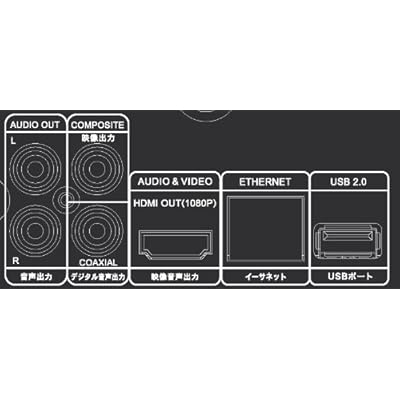
I presume the only cable you get is a power one?
-
Peacock
- Joined: Mon Dec 22, 2008 11:47 pm
- Location: Scotland
Re: All-Region DVD and Blu-ray Player Advice
TMDaines wrote:I presume the only cable you get is a power one?
no hdmi included or anything else to connect directly to speakersPeacock wrote:the only cables it comes with are:
one of those red white and yellow (on both ends) cables (for audio and video)
the power cable
-
perkizitore
- Joined: Thu Jul 10, 2008 7:29 pm
- Location: OOP is the only answer
Re: All-Region DVD and Blu-ray Player Advice
If this is a clone of the Momitsu 799, it's a huge bargain! In the US Sherwood BDP-5004 which is a clone of the previous and bulkier Momitsu 899, costs 50£ more.
-
Finch

- Joined: Mon Jul 07, 2008 9:09 pm
- Location: United States
Re: All-Region DVD and Blu-ray Player Advice
Hmm. For £50 it really sounds like a steal but having to enter a code every time you want to watch a Blu (apparently even UK discs) and the design of the thing put me off a little. I'm also a bit wary of buying hardware at such low prices because it makes me concerned about the longevity of these machines. I'd also want the best possible upscaling for DVDs so am prepared to pay more. At this moment, I'm inclined to keep waiting until April and either go for the modified Panasonic sold by the store in Petersborough or the Oppo. Your heads-up is very much appreciated though, Peacock. Enjoy Blu! 
(And we should meet up sometime)
(And we should meet up sometime)
-
perkizitore
- Joined: Thu Jul 10, 2008 7:29 pm
- Location: OOP is the only answer
Re: All-Region DVD and Blu-ray Player Advice
Unless you go for the Oppo, there isn't another player that will justify the price difference. In the US this is being sold as Momitsu 799 for 250$, so we should be thankful and not sceptic about the low price. It's being sold from HMV so if anything happens they will compensate you, but if it breaks after the warranty ends you will only have paid 50£ for 2 years of multi-region freedom!
-
swo17

- Bloodthirsty Butcher
- Joined: Tue Apr 15, 2008 2:25 pm
- Location: SLC, UT
Re: All-Region DVD and Blu-ray Player Advice
If it's anything like my Momitsu, the Blu region coding resets to the default every time you turn it off. So if the default is Region A, you should only have to manually input a code before playing Region B discs, and vice versa if the default is Region B. Region-free BDs should play without requiring a code.Mr Finch wrote:having to enter a code every time you want to watch a Blu (apparently even UK discs)
Honestly, I was initially a bit put off by the prospect of manually entering codes all the time, but I've found I rarely have to do this in practice. Also, given that some R1 DVDs I've encountered refuse to play on a region-free player (for which I have to manually change to Region 1), I'm glad I didn't take the hardware modification route.
-
TMDaines
- Joined: Wed Nov 11, 2009 5:01 pm
- Location: Greater Manchester
Re: All-Region DVD and Blu-ray Player Advice
Indeed. As the player is an absolute bargain at only £50 I'm going to be picking one up tomorrow just so I have the ability to play region A Blu-rays at all and so I have a standalone region-free DVD player that I'll be able to use on my parents TV when I'm at home. My PC monitor isn't HDCP compliant so I won't be able to use the player and still won't be able to watch Blu-rays when at university (thanks to the lack of component output as there isn't an easy way to convert composite to DVI/VGA I don't believe). I'll pick up a new monitor when prices have fallen significantly after the year abroad of my degree. I just hope one of the stores local to me is selling them for £50 when I ring round tomorrow.
-
Finch
- Joined: Mon Jul 07, 2008 9:09 pm
- Location: United States
Re: All-Region DVD and Blu-ray Player Advice
Folks at the AV forum are suggesting the Limit is a Momitsu 799 rebranded. It sounds like a great machine if you want to get solid hardware for very cheap but I think I'll stick to my original plans and go for Oppo in three months' time.
-
tojoed

- Joined: Wed Jan 16, 2008 3:47 pm
- Location: Cambridge, England
Re: All-Region DVD and Blu-ray Player Advice
Mr Finch, even on the modified players(from Multiregionmagic) you have to change the Blu region on the remote. This is because there is currently no all-region code for Blu, I think.
EDIT: Swo's came in as I posted.
EDIT: Swo's came in as I posted.
-
TMDaines
- Joined: Wed Nov 11, 2009 5:01 pm
- Location: Greater Manchester
Re: All-Region DVD and Blu-ray Player Advice
Even in the forseeable future I don't think you'll be able to do it without manually changing codes (unless you get an HDCP remover or so built in) due to the way HDCP works.tojoed wrote:Mr Finch, even on the modified players(from Multiregionmagic) you have to change the Blu region on the remote. This is because there is currently no all-region code for Blu, I think.
EDIT: Swo's came in as I posted.
-
perkizitore
- Joined: Thu Jul 10, 2008 7:29 pm
- Location: OOP is the only answer
Re: All-Region DVD and Blu-ray Player Advice
The good thing about hardware modification is that you can freely make firmware updates, the downside is that the change is permanent. However, you can't just remove the firmware and put it back again each time you want to watch an R1 only compatible disc, the codes are changing blu-ray regions only while DVD playback remains Region 0. So your only solution to this problem is a separate player.swo17 wrote:If it's anything like my Momitsu, the Blu region coding resets to the default every time you turn it off. So if the default is Region A, you should only have to manually input a code before playing Region B discs, and vice versa if the default is Region B. Region-free BDs should play without requiring a code.Mr Finch wrote:having to enter a code every time you want to watch a Blu (apparently even UK discs)
Honestly, I was initially a bit put off by the prospect of manually entering codes all the time, but I've found I rarely have to do this in practice. Also, given that some R1 DVDs I've encountered refuse to play on a region-free player (for which I have to manually change to Region 1), I'm glad I didn't take the hardware modification route.
I have the Oppo, but i am still considering getting this as a second player (Oppo occasionally has playback problems with some discs). Also, in the unlikely event my Oppo is kaput, i will still have a region-free device (these won't be on sale forever).Mr Finch wrote:Folks at the AV forum are suggesting the Limit is a Momitsu 799 rebranded. It sounds like a great machine if you want to get solid hardware for very cheap but I think I'll stick to my original plans and go for Oppo in three months' time.
-
TMDaines
- Joined: Wed Nov 11, 2009 5:01 pm
- Location: Greater Manchester
Re: All-Region DVD and Blu-ray Player Advice
Is the consensus when you get this player not to update firmware unless you have a reason to?
-
perkizitore
- Joined: Thu Jul 10, 2008 7:29 pm
- Location: OOP is the only answer
Re: All-Region DVD and Blu-ray Player Advice
I don't know if this is region-free solely based on its original firmware or hardware based, i have to go through AVforums to check, although i suspect the former. However, if the company circulates the player with multi-region firmware in the first place, why not continue to do so with the updates?TMDaines wrote:Is the consensus when you get this player not to update firmware unless you have a reason to?
-
TMDaines
- Joined: Wed Nov 11, 2009 5:01 pm
- Location: Greater Manchester
Re: All-Region DVD and Blu-ray Player Advice
Well I've got the phone numbers of five local-ish HMV stores written down so I'll ring around tomorrow and see who is selling them for £50 before making the epic journey across the snowy wastelands of the North West. I hope I get back alive.
-
Peacock
- Joined: Mon Dec 22, 2008 11:47 pm
- Location: Scotland
Re: All-Region DVD and Blu-ray Player Advice
Testing the player tonight I tried three different disks (I haven't got an hdmi cable yet, so just played it through the audio and video cable)
Il Grido - region 0 dvd
La Bete Humaine - region 1 dvd
Angel Face - region 1 dvd
i skipped to sections in the first two but both looked fine.
I watched all of Angel Face and throughout the entire film there would be brief black flashes on screen, usually in twos or threes, sometimes a couple of times a minute, sometimes once every 10. I rewound and played them back and it was always in the same places.
I later tried playing the disk on my dvdplayer and none of the flashes occurred.
From what i've heard online it's because information is being upscaled and is too much for the 3 part vid/audio cable to handle, and it would go away using an hdmi. But i wasn't watching a blu, or indeed using an hdmi cable so why would it upscale it? In the settings menu I was on auto hdmi, i tried changing it to 720p and the problem still persisted.
Elsewhere online it said black flashes might require a firmware update (something i haven't done yet, as it can't be done wirelessly seemingly)
So this is a bit worrying for me, I hope after the update it'll be ok; and i'll try playing through a 15 min section on another region 1 disk and a region 2, to see if it's a problem all round, or if maybe the player just doesn't like the disk?
Il Grido - region 0 dvd
La Bete Humaine - region 1 dvd
Angel Face - region 1 dvd
i skipped to sections in the first two but both looked fine.
I watched all of Angel Face and throughout the entire film there would be brief black flashes on screen, usually in twos or threes, sometimes a couple of times a minute, sometimes once every 10. I rewound and played them back and it was always in the same places.
I later tried playing the disk on my dvdplayer and none of the flashes occurred.
From what i've heard online it's because information is being upscaled and is too much for the 3 part vid/audio cable to handle, and it would go away using an hdmi. But i wasn't watching a blu, or indeed using an hdmi cable so why would it upscale it? In the settings menu I was on auto hdmi, i tried changing it to 720p and the problem still persisted.
Elsewhere online it said black flashes might require a firmware update (something i haven't done yet, as it can't be done wirelessly seemingly)
So this is a bit worrying for me, I hope after the update it'll be ok; and i'll try playing through a 15 min section on another region 1 disk and a region 2, to see if it's a problem all round, or if maybe the player just doesn't like the disk?
-
Peacock
- Joined: Mon Dec 22, 2008 11:47 pm
- Location: Scotland
Re: All-Region DVD and Blu-ray Player Advice
For those who care(!) I solved the problem:
I knew my tv wasn't 1080p, but 1080i. In the menu you have the choice between:
hdmi auto
1080p
1080i
720p
420p
420i
I tried them all and finally with 420i and the flashing black problem went away.
Presumedly when my hdmi cable gets here, i'll still have the flashing black problem with all of these except for then i'll be able to use 1080i, because i guess my lcd must be interlaced?
I'll re-edit this post after i've seen the players capabilities with an hdmi and Region A disk
I knew my tv wasn't 1080p, but 1080i. In the menu you have the choice between:
hdmi auto
1080p
1080i
720p
420p
420i
I tried them all and finally with 420i and the flashing black problem went away.
Presumedly when my hdmi cable gets here, i'll still have the flashing black problem with all of these except for then i'll be able to use 1080i, because i guess my lcd must be interlaced?
I'll re-edit this post after i've seen the players capabilities with an hdmi and Region A disk
-
denti alligator

- Joined: Thu Nov 04, 2004 1:36 am
- Location: "born in heaven, raised in hell"
Re: All-Region DVD and Blu-ray Player Advice
Got the Sherwood.
Code works. Plays anything you throw at it, though it took me a while to figure out I had to turn HDMI video out to 1080p (not auto, which would not play PAL).
On first look it appears very nice. I need to do some comparing of upscaling abilities, but so far it looks good.
Two things I definitely do NOT like about it:
1. The fucking bright blue colors! (ugh and ouch on the eyes!)
2. it's one loud piece of machinery. High-pitched wizzing while playing is not pleasant to hear.
I'll report back on upscaling. So far--due to its ease with regions 2 and B and with PAL--I'm thinking of returning my Panasonic (even though it appears to be built better, and certainly looks and sounds better ... oh, and it's cheaper, too.)
Code works. Plays anything you throw at it, though it took me a while to figure out I had to turn HDMI video out to 1080p (not auto, which would not play PAL).
On first look it appears very nice. I need to do some comparing of upscaling abilities, but so far it looks good.
Two things I definitely do NOT like about it:
1. The fucking bright blue colors! (ugh and ouch on the eyes!)
2. it's one loud piece of machinery. High-pitched wizzing while playing is not pleasant to hear.
I'll report back on upscaling. So far--due to its ease with regions 2 and B and with PAL--I'm thinking of returning my Panasonic (even though it appears to be built better, and certainly looks and sounds better ... oh, and it's cheaper, too.)
-
TMDaines
- Joined: Wed Nov 11, 2009 5:01 pm
- Location: Greater Manchester
Re: All-Region DVD and Blu-ray Player Advice
Just managed to reserve one of the Limit Blu-ray players at the Crewe HMV store for £49.99. Now I've just got to hope that at least one train runs so I can get there to pick it up.
Update: They had six when I ordered and when I picked mine up at 11am (store opens at 9am) they had sold out. They even wanted to see ID from me to confirm it me was who had reserved it earlier. These will likely be 90% gone across the country by the end of today I reckon.
Update: They had six when I ordered and when I picked mine up at 11am (store opens at 9am) they had sold out. They even wanted to see ID from me to confirm it me was who had reserved it earlier. These will likely be 90% gone across the country by the end of today I reckon.