Page 90 of 97
Re: Technical Issues and Questions
Posted: Tue Apr 22, 2025 3:10 pm
by EddieLarkin
The UB9000 really doesn't offer much over the 820 apart from superior build quality. And the price difference is huge.
The Panasonic 820 is your best bet although no 4K player really matches up to the Oppo 203 sadly. There seems to be a not insignificant amount of units out there that have dodgy drives and so often experience freezing/skipping (this could potentially be therewillbeblus issue), some units have problems with Dolby Vision in general (also potentially therewillbeblus issue, though I understood recent firmware made this issue a lot better), and as a few boutique labels have found recently, even some properly authored discs can encounter global issues in Dolby Vision on the 820. As far as I know the UB9000 has the same chipset as the 820 and so I think that means any of these issues could be just as potentially apparent on the UB9000 also.
It does allow you to move subtitles AND adjust their luminance though which is a great help with subtitles in HDR (even the Oppo doesn't offer this).
The only other option really is the Sony X700, but its build quality is laughable, and it very stupidly forces Dolby Vision onto everything if you have DV turned on. So you have to remember to turn it off whenever you want to play a HDR10 only disc or a Blu-ray. It is also has a history of struggling with triple layer discs, lots of reports of skipping/freezing at the third layer change. My own unit suffers from this though I think the source may be an overheating issue, as permenantly removing the top of the player and seating it on some feet seems to have largely solved the issue.
Both are on mrmdvd.com so can be made region free. Though the 820 gets you pretty far with just the Top Menu trick, which gives you access to a lot of Region A Blu-rays without any modding (including all Criterions).
Re: Technical Issues and Questions
Posted: Tue Apr 22, 2025 4:02 pm
by therewillbeblus
It appears that HDMi cables make a difference too - I wasn't aware they could get old and overused.. if that's even a thing? I just switched out my cable for another exact duplicate (I bought a pack of three or something a while back) that had never been used and my disc is playing fine in DV right now
Re: Technical Issues and Questions
Posted: Tue Apr 22, 2025 4:52 pm
by DeprongMori
EddieLarkin wrote: Tue Apr 22, 2025 3:10 pm
The UB9000 really doesn't offer much over the 820 apart from superior build quality. And the price difference is huge.
The Panasonic 820 is your best bet although no 4K player really matches up to the Oppo 203 sadly. There seems to be a not insignificant amount of units out there that have dodgy drives and so often experience freezing/skipping (this could potentially be therewillbeblus issue), some units have problems with Dolby Vision in general (also potentially therewillbeblus issue, though I understood recent firmware made this issue a lot better), and as a few boutique labels have found recently, even some properly authored discs can encounter global issues in Dolby Vision on the 820. As far as I know the UB9000 has the same chipset as the 820 and so I think that means any of these issues could be just as potentially apparent on the UB9000 also.
It does allow you to move subtitles AND adjust their luminance though which is a great help with subtitles in HDR (even the Oppo doesn't offer this).
The only other option really is the Sony X700, but its build quality is laughable, and it very stupidly forces Dolby Vision onto everything if you have DV turned on. So you have to remember to turn it off whenever you want to play a HDR10 only disc or a Blu-ray. It is also has a history of struggling with triple layer discs, lots of reports of skipping/freezing at the third layer change. My own unit suffers from this though I think the source may be an overheating issue, as permenantly removing the top of the player and seating it on some feet seems to have largely solved the issue.
Both are on mrmdvd.com so can be made region free. Though the 820 gets you pretty far with just the Top Menu trick, which gives you access to a lot of Region A Blu-rays without any modding (including all Criterions).
Personally I would recommend against the Panasonic UB820, especially for US users trying to play UK Blu-ray content (and some region-free DVDs) with modded firmware. This player gives me a multitude of problems that have not occurred with any of my other players. I am running the current firmware.
• It completely and consistently bungles SD content (supplements) on UK Blu-rays, providing audio but no video. (See BFI’s Blu-ray of “The Draughtsman’s Contract”, or Screenbound’s Blu-ray of “Witchfinder General”, and many others).
• It completely scrambles subtitles on Edition Filmmuseum DVD playback, truncating the display area and not clearing previous lines before displaying new lines. I’ve seen the same problem with subtitles on some other DVDs on the player, but consistently with Edition Filmmuseum.
I’ve run into a number of other quirky problems occasionally that I can’t recall at the moment, but I need to keep a second player handy in my living room to hook up temporarily whenever I run into problems with the UB820, which is far more frequent than I would like.
Again, none of my players except for the UB820 exhibit these problems. It’s the only player I’ve ever bought that I regret buying. The only reason I can see for choosing this player is if authoring disks in order to check whether material won’t play on it.
Curious whether UK users of the player have encountered these issues.
Re: Technical Issues and Questions
Posted: Tue Apr 22, 2025 5:52 pm
by therewillbeblus
I like my Panasonic UB820 overall, but I do agree that having a second player handy for subbed files/discs is a good idea. I remember my Region B Mai Zetterling DVD set subtitles were scrambled on the 820 but not on my Sony 3700, and I also solely play USB files on my Sony because sometimes the subs or files don't translate well on the Panasonic
Re: Technical Issues and Questions
Posted: Tue Apr 22, 2025 10:41 pm
by therewillbeblus
therewillbeblus wrote: Tue Apr 22, 2025 4:02 pm
It appears that HDMi cables make a difference too - I wasn't aware they could get old and overused.. if that's even a thing? I just switched out my cable for another exact duplicate (I bought a pack of three or something a while back) that had never been used and my disc is playing fine in DV right now
Nevermind, issues persist, but they got 'better' for a hot minute
Re: Technical Issues and Questions
Posted: Tue Apr 22, 2025 10:43 pm
by nicolas
therewillbeblus wrote: Tue Apr 22, 2025 10:41 pm
therewillbeblus wrote: Tue Apr 22, 2025 4:02 pm
It appears that HDMi cables make a difference too - I wasn't aware they could get old and overused.. if that's even a thing? I just switched out my cable for another exact duplicate (I bought a pack of three or something a while back) that had never been used and my disc is playing fine in DV right now
Nevermind, issues persist, but they got 'better' for a hot minute
These are at least HDMI 2.0 cables, right?
Re: Technical Issues and Questions
Posted: Tue Apr 22, 2025 11:06 pm
by therewillbeblus
nicolas wrote: Tue Apr 22, 2025 10:43 pm
therewillbeblus wrote: Tue Apr 22, 2025 10:41 pm
therewillbeblus wrote: Tue Apr 22, 2025 4:02 pm
It appears that HDMi cables make a difference too - I wasn't aware they could get old and overused.. if that's even a thing? I just switched out my cable for another exact duplicate (I bought a pack of three or something a while back) that had never been used and my disc is playing fine in DV right now
Nevermind, issues persist, but they got 'better' for a hot minute
These are at least HDMI 2.0 cables, right?
These ones
Re: Technical Issues and Questions
Posted: Tue Apr 22, 2025 11:56 pm
by nicolas
therewillbeblus wrote: Tue Apr 22, 2025 11:06 pm
nicolas wrote: Tue Apr 22, 2025 10:43 pm
therewillbeblus wrote: Tue Apr 22, 2025 10:41 pm
Nevermind, issues persist, but they got 'better' for a hot minute
These are at least HDMI 2.0 cables, right?
These ones
Yours look good and should be HDMI 2.0. Curious that the shop doesn’t list that info in the specs. I’ve had a some connection issues with older HDMI cables myself and subsequently exchanged all of them to braided ones like these (but from a different, local manufacturer):
https://www.amazon.com/8K-HDMI-Cable-Hi ... 08M9HND4F/. Never had any issues since and price-wise they’re almost identical. I’ve no idea though if the additional coating is just an advertising gimmick or gives an actual benefit in reality.
Re: Technical Issues and Questions
Posted: Tue Jun 24, 2025 12:14 am
by denti alligator
I’m in the market for a TV, probably 65 inches, 4K. I don’t ned the fancy bells and whistles. Just superlative picture quality. I can’t make sense of the different models. Any advice? LG OLED? OK, but which one?
Re: Technical Issues and Questions
Posted: Tue Jun 24, 2025 3:49 am
by DeprongMori
denti alligator wrote: Tue Jun 24, 2025 12:14 am
I’m in the market for a TV, probably 65 inches, 4K. I don’t ned the fancy bells and whistles. Just superlative picture quality. I can’t make sense of the different models. Any advice? LG OLED? OK, but which one?
After much research and talks with other people who have done much research, I just (last week) ended up replacing my failing 51’ Samsung plasma HDTV with a 65”
Sony A95L as reportedly the best picture quality. Still working out some audio lag issues from my receiver, but the picture is in fact excellent. It is also a tad expensive.
Re: Technical Issues and Questions
Posted: Fri Jun 27, 2025 10:13 pm
by Altair
Any help with the following UHD player problem would be enormously appreciated -
I just bought a Panasonic DP-UB159 UHD player and when I play a BD which has a 1.85:1 aspect ratio, it plays the film fullscreen (no black bars at the top and bottom at all). When I play a BD that is 2.35:1, it plays it significantly cropped on the left and right (in essence it looks almost like a 1.85:1 aspect ratio). The Panasonic player has no option to change the aspect ratio, either on the remote or through the sub-menus. I've tried every configuration on the player and TV that I can think of and it hasn't changed it one bit. If I can't remedy this in the next few days, then I'll have to return the player, so any advice (Google has not helped, alas) would be phenomenal.
Re: Technical Issues and Questions
Posted: Sat Jun 28, 2025 12:30 am
by Michael Kerpan
What sort of TV do you have, How is the player connected to the TV. Can you fiddle with the TV's picture controls to get things right. Sometimes players don't read/set "flags" right and one has to manually adjust the TV's picture size.
Re: Technical Issues and Questions
Posted: Sat Jun 28, 2025 4:25 pm
by Altair
It's an LG 50UQ80006LB - resetting the TV means that the UHD player now shows 1.85:1 films correctly, but still plays 2.35:1 films as a 1.85:1. I have the TV set to Filmmaker, 16:9, and Just Scan modes, but that doesn't change how the player shows Lawrence of Arabia for instance (cropping the sides).
Re: Technical Issues and Questions
Posted: Sun Jun 29, 2025 2:25 am
by Michael Kerpan
No other picture modes on the TV to experiment with?
Re: Technical Issues and Questions
Posted: Sun Jun 29, 2025 7:40 am
by Altair
Sadly none that I can find - I previously had a very basic LG BD player that had no trouble.
Re: Technical Issues and Questions
Posted: Sun Jun 29, 2025 8:09 am
by EddieLarkin
Is there an alternative AR option on the TV? Instead of 16:9, perhaps Auto or Original?
I'm know it's frustrating since it's the player that is new, but this is more likely the TV causing the issue, not the player (I don't think Panasonic players have any ability to change the AR in this way).
Re: Technical Issues and Questions
Posted: Sun Jun 29, 2025 8:40 am
by Altair
I have tried auto and original - I suspect you are right that it is the TV causing this. Which players do allow you to change the aspect ratio?
Re: Technical Issues and Questions
Posted: Sun Jun 29, 2025 10:45 am
by EddieLarkin
Is this happening with UHDs or just BDs? If the latter, try changing the Video Format in Picture in the player menu, as well as the 4K output and 24p output options. The problem may be caused by the way the player is upscaling the image, and then being misinterpreted by the TV.
Re: Technical Issues and Questions
Posted: Sun Jun 29, 2025 7:34 pm
by knives
This is a streaming question. Last night I started a movie on the Roku channel and the subs played perfectly. This afternoon when I went to finish watching the subs no longer played. My TV, a Phillips Roku, is set to captions always on.
Re: Technical Issues and Questions
Posted: Sun Jun 29, 2025 8:54 pm
by fdm
Make sure the subs are still turned on.
Re: Technical Issues and Questions
Posted: Sun Jun 29, 2025 8:59 pm
by knives
They are turned on.
Re: Technical Issues and Questions
Posted: Fri Jul 04, 2025 10:03 pm
by Godot
Posting this in case anyone else has a similar issue.
My Oppo BDP-80 was running oddly: wouldn't read some Eureka discs (but would others), would suddenly turn off, ran hot. Left it alone for 6 months while considering options, only to find it wouldn't turn back on. I considered buying a used Oppo, or buying new region-free modified player, or sending the whole player to Oppo repair, but wanted a lower-cost solution.
I found this very helpful
repair video, and walked through similar steps. Sure enough, the large capacitor (which I believe dampens the circuit against spikes and overload) at the cord-input circuit of the power supply board was bulging and leaking brown goo. I looked up the capacitor values to match, the replacement part was ~$15 on Mouser and DigiKey. But I hesitated to do the de-soldering of the bad component and soldering of the new, lacking an iron and grounding strap.
I called a number of electronics repair services in my area (San Diego), none would do the simple repair, finally called an i-repair (phones, tablets) type shop in a mall. Sent them my pics of the board and component, they had a similar cap in stock, I brought them the board, and they did the repair in an hour, $30 out the door. Installed the board in the player chassis at home and
voila, player back up and running like new.
So if you have power problems it may be a simple fix on the circuit board.
I can post or share pictures of the capacitor and board, if anyone interested.
Re: Technical Issues and Questions
Posted: Fri Jul 04, 2025 10:49 pm
by redbill
I had a similar issue with a (not very old) monitor. I found the bad capacitor, bought a replacement, and fucked up the soldering. Great job and taking that smart extra step.
Re: Technical Issues and Questions
Posted: Sun Aug 17, 2025 8:49 am
by The Curious Sofa
I am going to move to a new apartment soon and am considering to treat myself to an upgrade of my display. I have a BenQ W1080ST which still looks pretty great, but am considering an XGIMI Horizon Ultra or a large UHD/4K TV. While I understand that a projector can never match a TV in terms of PQ, nothing beats the immersiveness of the larger image.
If you went from and HD to and UHD projector, was it worth it? Or did the improved PQ of a TV make up for the projected image?
Flying Radiologists
Posted: Wed Aug 20, 2025 8:02 pm
by Lemmy Caution
I was sending an old article about pigeons able to read mammograms as well as doctors to my radiologist friend. A fairly mindblowing prospect from a study done ten years ago. It's
worth reading the full article or even the full study. But one section caught my eye:
To keep alive in the wild, a pigeon needs to keep its eyes open for predators. Having eyes on the side of its head gives it a field of view of 340 degrees and, in order to fly at speed, its brain can process visual information three times faster than a human's. If a pigeon watched a feature film, 24 frames per second would appear to it like a slide presentation. They would need at least 75 frames per second to create the illusion of movement on screen. (This is why pigeons seem to leave it until the very last second to fly out of the way of an oncoming car: it appears much less fast to them.)
I'm not quite sure that's how things work, but it's a provocative concept.
Any thoughts?
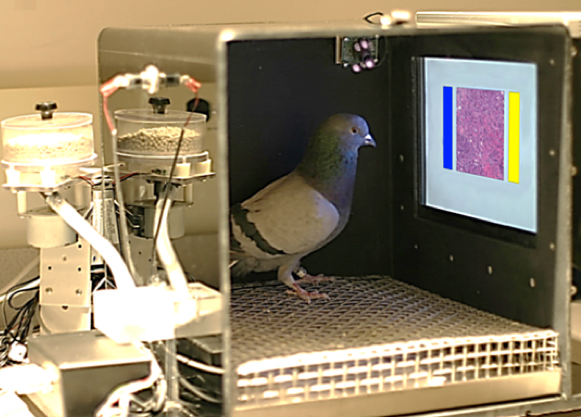
There are lots of speckled turtle doves in Shanghai Including my garden and when I see their head bobbing walk, I think Hey, Little Radiologists.